Features
Everything the control room needs. Shipped, not roadmap.
Every capability on this page is live in SYNQE today, from the first log entry to the final evidence pack.
Core operations
Log it. Dispatch it. Resolve it.
SYNQE runs the control room: staff log what's happening, reports become dispatched jobs in one click, and every job is tracked to resolution, live on every screen.
Operations · Running LogLive build
Running log
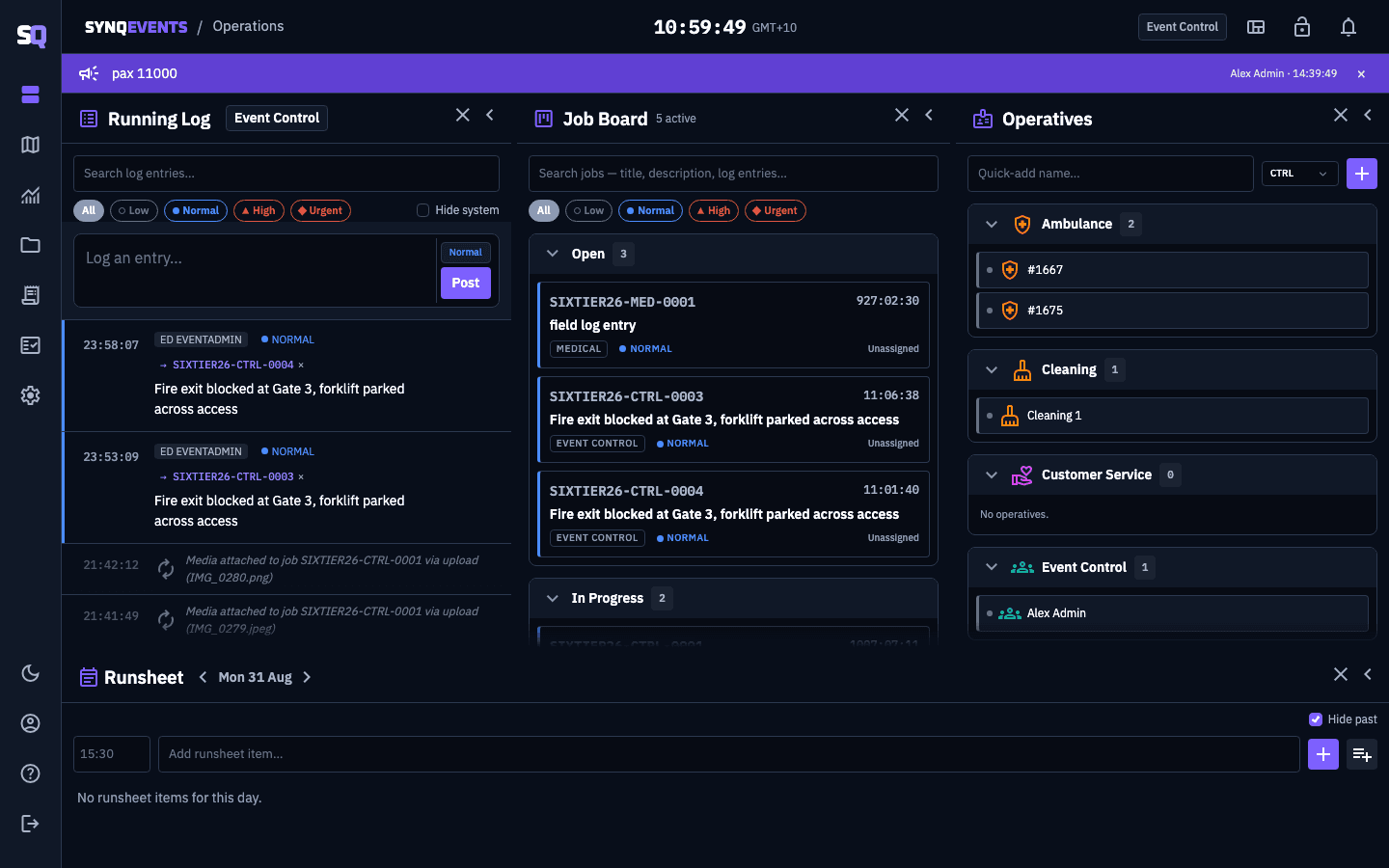
A live, chronological incident feed. Staff post updates with priority and location; entries colour-code by urgency and appear newest-first. One click promotes any entry into a dispatched job. Nothing gets re-typed.
Job dispatch & board
A Job Board panel on the Operations screen, grouping jobs by status (Open, In Progress, Closed). Each card carries a live age timer, location, category, priority and assignee. Assign, reassign, edit and update in real time.
Job collaboration
Share jobs across departments, link related jobs, and merge duplicates: fully reversible. Threaded job updates keep a running history of every action taken, by whom, when.
Real-time everywhere
Live updates push instantly to every connected screen. No refresh, ever. Works across multiple server instances, so large deployments stay in sync.
Operations dashboard
A reorganisable, tiling widget dashboard for the control room, with saved layouts and closable widgets. Includes an Announcements banner (promote any log entry into an org- or event-wide notice) and a live Runsheet widget: the event's running order with a hide-past filter, live time amends with a running-late/early indicator, ad hoc adds, and department-scoped notes per item. The full schedule is set up in advance from the Runsheet tab in Settings.
Notifications & single active assignment
Operatives can only be actively assigned to one open job at a time; reassigning someone already active elsewhere prompts a confirm-to-move. A notification bell (with optional slide-out toast) alerts both the operative and the assigning dispatcher on every move or unassign.
Live mapping & geospatial
Your venue, your floor plans, one live map
Every active job plotted on the real-world map, with your own floor plans georeferenced over it, level by level.
- Jobs map
- Every active job plotted live, colour-coded by priority, in-progress jobs ringed. Completed jobs hidden by default. Click a marker to jump straight to the job.
- Multi-floor site plans
- Upload floor plans as image or PDF and georeference them with true 4-corner perspective warping, so they sit correctly over the real-world map. Multiple levels per venue with a floor switcher.
- Smart floor filtering
- Three-state pin visibility (all floors, dim others, this floor only), so the control room can focus on one level without losing context.
- Address & place search
- Type an address or place name to fly the map there. Pin locations by clicking, with what3words supported when enabled for your organisation.
- Review Mode: risk-density heatmap
- A post-hoc analysis view on the jobs map: a filterable heatmap of job risk density (by time, department, incident type or priority) driven by a zoomable, pannable, auto-playing timeline for scrubbing back through how the event unfolded.
- Event anchoring
- Each event has a geographic home pin that centres every map and seeds coordinates for new jobs and locations.
Media & evidence
Evidence in from the field, out as a record
Photos and footage flow into jobs during the event, and export afterwards as a complete, self-contained incident record.
Field capture: no app, no login
Control room · JobLive build
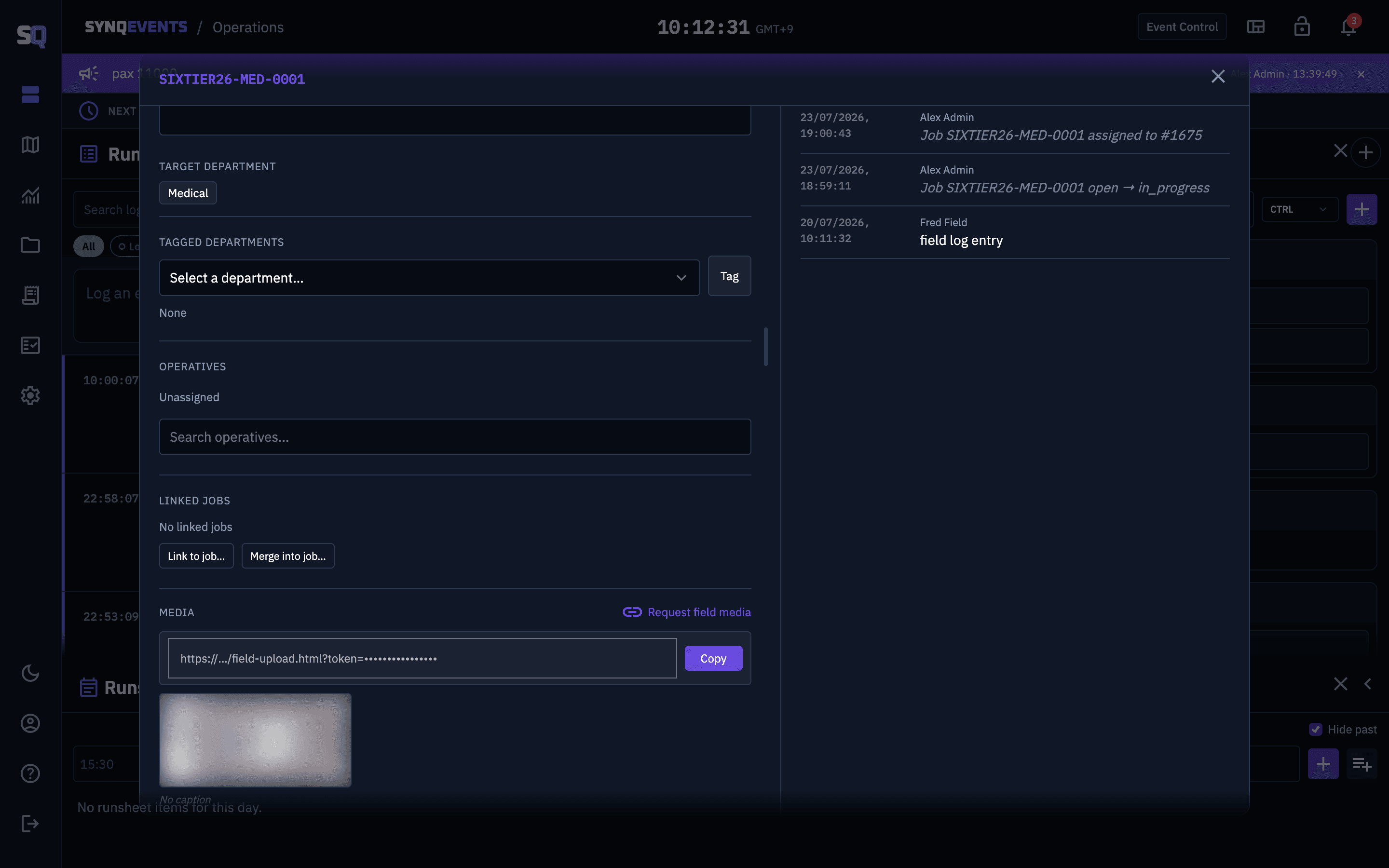
Single-use and secure. WhatsApp delivery supported when enabled for your organisation.
Rich media attachments
Photos, video, PDFs and documents on any job, with automatic thumbnails (video first-frame, PDF first-page) and an in-app lightbox viewer.
Safe delete & recovery
Soft-delete with confirmation, a mobile undo window, and admin-level recovery. Nothing is ever truly lost by accident.
Evidence pack export
One-click export of a complete incident record, built for post-event review, insurance and legal.
JSONCSVHTML evidence pack
Security & integrity
A record that holds up under scrutiny
Hash-chained means every entry is cryptographically linked to the one before it, in plain English: if anyone alters the record, it shows.
Tamper-evident audit trail
Every significant action is cryptographically hash-chained and append-only, so the record can be shown to be un-altered when it's reviewed by an insurer, a regulator or a court.
Hardening throughout
Rate limiting, input sanitisation, XSS and injection protection, signed-URL media access, and full security headers throughout.
Self-hosted front-end assets
Fonts, styles, mapping and charting libraries are served from our own origin, not a public CDN. Loading a SYNQE page discloses nothing about your operation to third parties. Known residual: map tiles are still fetched from public tile servers, which can observe an operator's IP and viewing area.
Aggregate-only cross-tenant reads
Platform usage analytics read counts, byte totals and timestamps across organisations, never row-level content. No log text, job titles, names or media. Enforced by an allowlist test on the query shape, and every read is audited and actor-attributed.
Role-based access: Tiers 1–6
Tier 1View-only: see the picture, change nothing
Tiers 2–5Granular capability steps from field logging up to event management
Tier 6Org Admin: full control
All tiersDepartment-level visibility + restricted/commander clearance
Multi-organisation platform
One platform, many organisations: fully isolated
Full multi-tenancy
Complete data isolation between organisations, enforced at the database level. Your data is never visible to another tenant: structurally, not just by policy.
Platform console
Super-admin provisioning of new customer organisations, suspend/reactivate, force-logout, and usage analytics (active users, storage, job and log volume) across every tenant.
Break-glass access
Time-boxed, fully-audited emergency access for support staff, logged on both the platform and your own audit trail, so you always know when and why.
Access & experience
Runs where your crews are
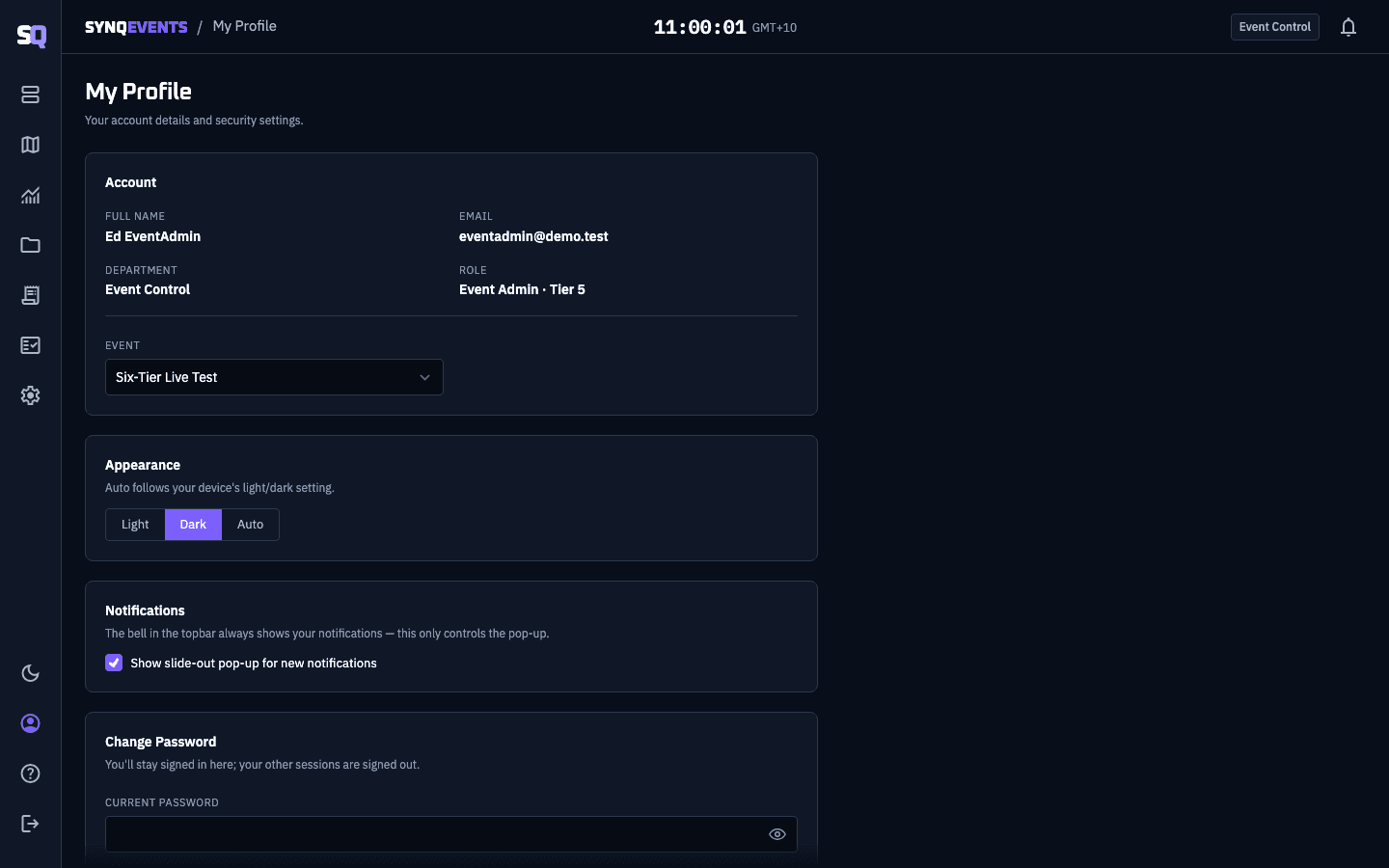
Theme toggle, in profile settingsOpen full size (opens in a new tab)
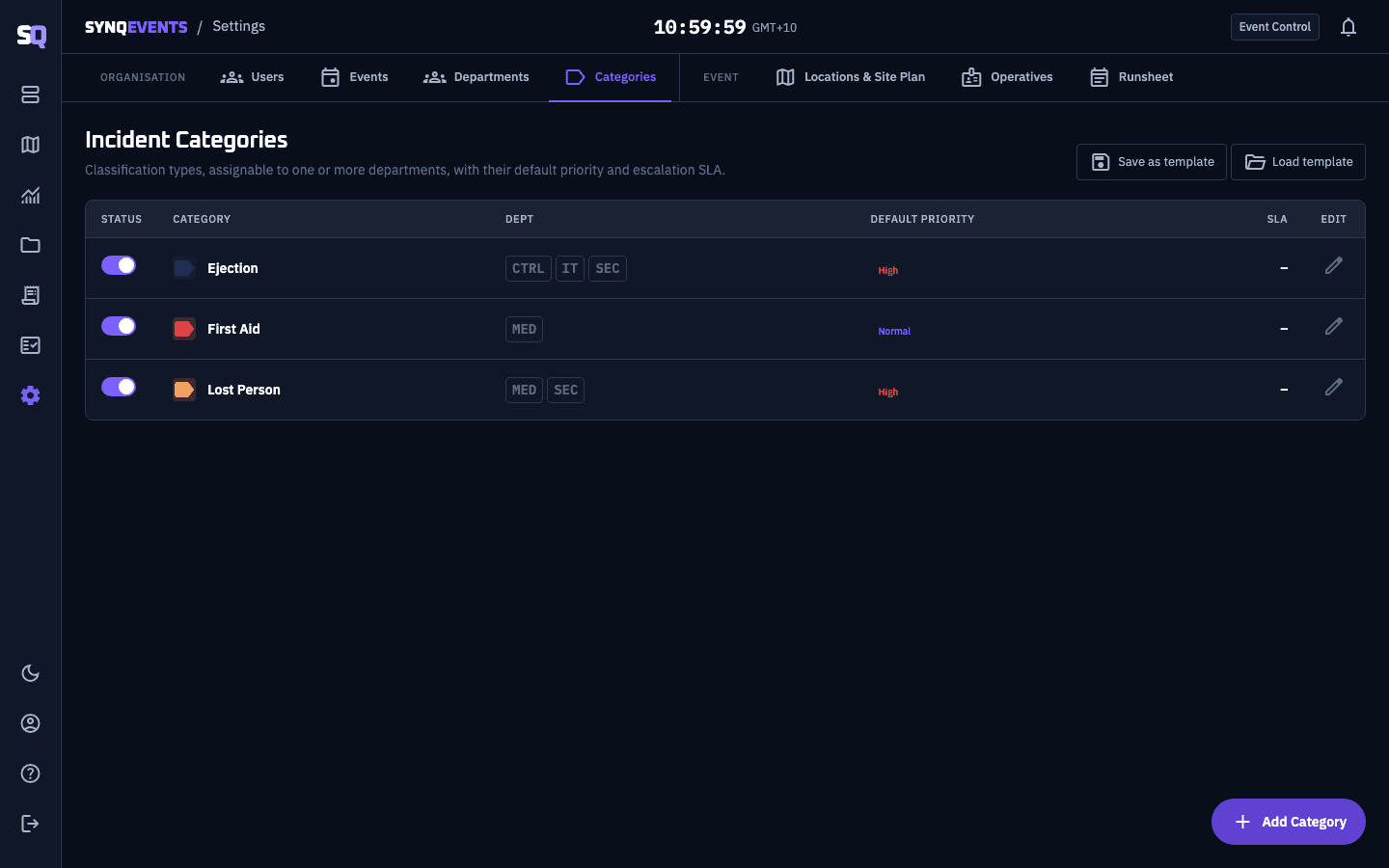
Configured per event, in SettingsOpen full size (opens in a new tab)
Installable web app
Home-screen icon, offline-capable shell, and full parity for field crews. No app store, no downloads to manage. Long-press a job card to claim or unclaim it; swipe to progress or demote its status.
Push notifications
Lock-screen alerts the moment a job is assigned to you. No need to watch the board.
Multi-event switching
Run and switch between multiple events from one top-bar control, one login for your whole season.
Configurable per event
Custom departments, incident categories (colour, priority, SLA), and reusable location presets per event.
Timezone-aware
Times render in each user's local timezone. Touring teams and remote coordinators always see the right clock.
Light, dark or auto
A full-app theme toggle in profile settings (Auto follows the operating system live), on top of one consistent design system across every page.
See it running with your own departments
We set up a demo event with your teams and incident categories, then walk through it with you for 30 minutes.